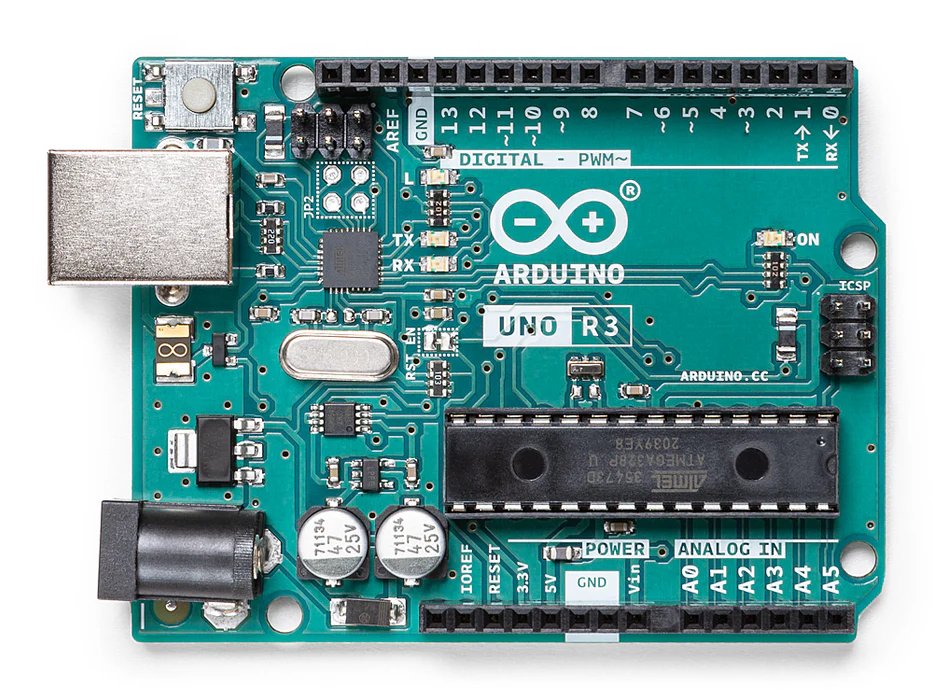
Source: Arduino.cc
When I first discovered Arduino, I was amazed by how accessible it made electronics and programming. Whether you're interested in building automated systems for your farm, creating smart home devices, or just learning about electronics, Arduino is an incredible platform to start with.
What is Arduino?
Arduino is an open-source electronics platform based on easy-to-use hardware and software. It consists of a physical programmable circuit board (microcontroller) and a piece of software (IDE) that runs on your computer, used to write and upload code to the board.
Why I Love Arduino
Through my 4-H projects, I've used Arduino to build many projects from small water meter systems to heart rate monitors. Here's why I think it's perfect for beginners:
- Affordable: Arduino boards start at around $20-30
- Beginner-Friendly: Tons of tutorials and a supportive community
- Versatile: Can be used for countless projects
- Real-World Applications: Solve actual problems in agriculture, home automation, and more
Getting Started: What You Need
Here's a basic starter kit that I recommend for anyone beginning their Arduino journey:
- Arduino Uno Board: The most popular and beginner-friendly board
- USB Cable: To connect your Arduino to your computer
- Breadboard: For building circuits without soldering
- Jumper Wires: To connect components
- LEDs: For your first "Hello World" project
- Resistors: Essential for protecting components
- Sensors: Temperature, humidity, or light sensors to start experimenting
Your First Project: Blinking LED
The traditional first Arduino project is making an LED blink. It's simple but teaches you the fundamentals. Here's the code:
void setup() {
  pinMode(13, OUTPUT); // Set pin 13 as output
}

void loop() {
  digitalWrite(13, HIGH);  // Turn LED on
  delay(1000);             // Wait 1 second
  digitalWrite(13, LOW);   // Turn LED off
  delay(1000);             // Wait 1 second
}
Understanding the Code
Let me break down what's happening:
void setup()runs once when the Arduino startspinMode(13, OUTPUT)configures pin 13 to send signalsvoid loop()runs continuouslydigitalWrite()sends HIGH (on) or LOW (off) to the pindelay(1000)pauses for 1000 milliseconds (1 second)
My Arduino Journey in 4-H
My first major Arduino project was Water Meter that ended up winning the Alexander Graham Bell Prize in the 2021 AT&T Inventor's Challenge. This is a small device that tracks your water usage at a specific place like your hose, sinks, and showers.
Here are some projects I built:
- Heart Rate Buddy - A mini heart rate monitor
- Clear Water - A water level monitor for fish tanks
- And many more minor projects!
Each project taught me new skills and helped me see how technology can solve real-world problems in our communities.
Tips for Success
Here are some lessons I've learned along the way:
- Start Simple: Don't try to build complex projects immediately. Master the basics first.
- Use Online Resources: Arduino has excellent tutorials, and Youtube is full of project ideas.
- Join a Community: 4-H clubs, maker spaces, or online forums can provide support and inspiration.
- Document Your Work: Take photos and notes. It helps when troubleshooting and sharing with others.
- Don't Fear Failure: Every mistake is a learning opportunity. In the end it'll be worth it!
Next Steps
Once you're comfortable with the basics, consider these intermediate projects:
- Temperature and humidity monitoring with DHT22 sensor
- LCD display to show sensor readings
- Servo motor control for automated mechanisms
- Bluetooth or WiFi connectivity for remote monitoring
Conclusion
Arduino opened up a world of possibilities for me. It's not just about learning to code or build circuits—it's about solving problems, being creative, and making things that actually help people. Whether you're interested in agriculture like me, or robotics, home automation, or art installations, Arduino is a fantastic tool to bring your ideas to life.
What will you build? I'd love to hear about your Arduino projects! Feel free to reach out through the contact form or connect with me on social media.
Happy making!